libcom.color_transfer
- libcom.color_transfer.color_transfer(composite_image, composite_mask)[source]
Generate composite image through copy-and-paste.
- Parameters
composite_image (str | numpy.ndarray) – The path to composite image or the compposite image in ndarray form.
composite_mask (str | numpy.ndarray) – Mask of composite image which indicates the foreground object region in the composite image.
- Returns
Transfered image with the same resolution as input image.
- Return type
transfered image (numpy.ndarray)
Examples
>>> from libcom import color_transfer
>>> from libcom.utils.process_image import make_image_grid
>>> import cv2
>>> comp_img1  = '../tests/source/composite/1.jpg'
>>> comp_mask1 = '../tests/source/composite_mask/1.png'
>>> trans_img1 = color_transfer(comp_img1, comp_mask1)
>>> comp_img2  = '../tests/source/composite/8.jpg'
>>> comp_mask2 = '../tests/source/composite_mask/8.png'
>>> trans_img2 = color_transfer(comp_img2, comp_mask2)
>>> # visualization results
>>> grid_img  = make_image_grid([comp_img1, comp_mask1, trans_img1,
>>>                             comp_img2, comp_mask2, trans_img2], cols=3)
>>> cv2.imwrite('../docs/_static/image/colortransfer_result1.jpg', grid_img)
Expected result:

libcom.fos_score
- class libcom.fos_score.FOSScoreModel(device=0, model_type='FOS_D', **kwargs)[source]
Foreground object search score prediction model.
- Parameters
device (str | torch.device) – gpu id
model_type (str) – predefined model type
kwargs (dict) – other parameters for building model
Examples
>>> from libcom.utils.process_image import make_image_grid
>>> from libcom import FOSScoreModel
>>> import cv2
>>> import torch
>>> task_name = 'fos_score_prediction'
>>> MODEL_TYPE = 'FOS_D'
>>> background = '../tests/source/background/f80eda2459853824_m09g1w_b2413ec8_11.png'
>>> fg_bbox    = [175, 82, 309, 310] # x1,y1,x2,y2
>>> foreground = '../tests/source/foreground/f80eda2459853824_m09g1w_b2413ec8_11.png'
>>> foreground_mask = '../tests/source/foreground_mask/f80eda2459853824_m09g1w_b2413ec8_11.png'
>>> composite_image = '../tests/source/composite/f80eda2459853824_m09g1w_b2413ec8_11.png'
>>> net = FOSScoreModel(device=0, model_type=MODEL_TYPE)
>>> score = net(background, foreground, fg_bbox, foreground_mask=foreground_mask)
>>> grid_img  = make_image_grid([background, foreground, composite_image], text_list=[f'fos_score:{score:.2f}'])
>>> cv2.imshow('fos_score_demo', grid_img)
Expected result:


- __call__(background_image, foreground_image, bounding_box, foreground_mask=None)
Predicting the compatibility score between the given background and the given foreground.
- Parameters
background_image (str | numpy.ndarray) – The path to background image or the background image in ndarray form.
foreground_image (str | numpy.ndarray) – The path to foreground image or the background image in ndarray form.
bounding_box (list) – The bounding box which indicates the foreground’s location in the background. [x1, y1, x2, y2].
foreground_mask (str | numpy.ndarray) – Mask of foreground image which indicates the foreground object region in the foreground image. default: None.
- Returns
Predicted compatibility score between the given background image and the given foreground image.
- Return type
fos_score (float)
libcom.harmony_score
- class libcom.harmony_score.HarmonyScoreModel(device=0, model_type='BargainNet', **kwargs)[source]
Foreground object search score prediction model.
- Parameters
device (str | torch.device) – gpu id
model_type (str) – predefined model type.
kwargs (dict) – other parameters for building model
Examples
>>> from libcom import HarmonyScoreModel
>>> from libcom.utils.process_image import make_image_grid
>>> import cv2
>>> net = HarmonyScoreModel(device=0, model_type='BargainNet')
>>> test_dir   = '../tests/harmony_score_prediction/'
>>> img_names  = ['vaulted-cellar-247391_inharm.jpg', 'ameland-5651866_harm.jpg']
>>> vis_list,scores = [], []
>>> for img_name in img_names:
>>>     comp_img  = test_dir + 'composite/' + img_name
>>>     comp_mask = test_dir + 'composite_mask/' + img_name
>>>     score     = net(comp_img, comp_mask)
>>>     vis_list += [comp_img, comp_mask]
>>>     scores.append(score)
>>> grid_img  = make_image_grid(vis_list, text_list=[f'harmony_score:{scores[0]:.2f}', 'composite-mask', f'harmony_score:{scores[1]:.2f}', 'composite-mask'])
>>> cv2.imwrite('../docs/_static/image/harmonyscore_result1.jpg', grid_img)
Expected result:

- __call__(composite_image, composite_mask)
Predicting the compatibility score between background and foreground in the given composite image.
- Parameters
composite_image (str | numpy.ndarray) – The path to composite image or the compposite image in ndarray form.
composite_mask (str | numpy.ndarray) – Mask of composite image which indicates the foreground object region in the composite image.
- Returns
Predicted harmony score within [0,1] between background region and foreground region of the given composite image. Larger harmony score implies more harmonious composite image.
- Return type
harmony_score (float)
libcom.naive_composition
- libcom.naive_composition.get_composite_image(foreground_image, foreground_mask, background_image, bbox, option='none')[source]
Generate composite image through copy-and-paste.
- Parameters
foreground_image (str | numpy.ndarray) – The path to foreground image or the background image in ndarray form.
foreground_mask (str | numpy.ndarray) – Mask of foreground image which indicates the foreground object region in the foreground image.
background_image (str | numpy.ndarray) – The path to background image or the background image in ndarray form.
bbox (list) – The bounding box which indicates the foreground’s location in the background. [x1, y1, x2, y2].
option (str) – ‘none’, ‘gaussian’, or ‘poisson’. Image blending method. default: None.
- Returns
Generated composite image with the same resolution as input background image. composite_mask (numpy.ndarray): Generated composite mask with the same resolution as composite image.
- Return type
composite_image (numpy.ndarray)
Examples
>>> from libcom import get_composite_image
>>> from libcom.utils.process_image import make_image_grid, draw_bbox_on_image
>>> import cv2
>>> test_dir = 'source/'
>>> img_list = ['1.jpg', '8.jpg']
>>> bbox_list = [[1000, 895, 1480, 1355], [1170, 944, 2331, 3069]]
>>> for i,img_name in enumerate(img_list):
>>>     bg_img  = test_dir + 'background/' + img_name
>>>     bbox    = bbox_list[i] # x1,y1,x2,y2
>>>     fg_img  = test_dir + 'foreground/' + img_name
>>>     fg_mask = test_dir + 'foreground_mask/' + img_name.replace('.jpg', '.png')
>>>     # generate composite images by naive methods
>>>     comp_img1, comp_mask1 = get_composite_image(fg_img, fg_mask, bg_img, bbox, 'none')
>>>     comp_img2, comp_mask2 = get_composite_image(fg_img, fg_mask, bg_img, bbox, 'gaussian')
>>>     comp_img3, comp_mask3 = get_composite_image(fg_img, fg_mask, bg_img, bbox, 'poisson')
>>>     vis_list = [bg_img, fg_img, comp_img1, comp_mask1, comp_img2, comp_mask2, comp_img3, comp_mask3]
>>>     # visualization results
>>>     grid_img  = make_image_grid(vis_list, cols=4)
>>>     cv2.imwrite(f'../docs/_static/image/generatecomposite_result{i+1}.jpg', grid_img)
Expected result:


libcom.opa_score
- class libcom.opa_score.OPAScoreModel(device=0, model_type='SimOPA', **kwargs)[source]
OPA score prediction model.
- Parameters
device (str | torch.device) – gpu id
model_type (str) – predefined model type.
kwargs (dict) – other parameters for building model
Examples
>>> from libcom import OPAScoreModel
>>> from libcom import get_composite_image
>>> from libcom.utils.process_image import make_image_grid
>>> import cv2
>>> net = OPAScoreModel(device=0, model_type='SimOPA')
>>> test_dir  = './source'
>>> bg_img    = 'source/background/17.jpg'
>>> fg_img    = 'source/foreground/17.jpg'
>>> fg_mask   = 'source/foreground_mask/17.png'
>>> bbox_list = [[475, 697, 1275, 1401], [475, 300, 1275, 1004]]
>>> comp1, comp_mask1 = get_composite_image(fg_img, fg_mask, bg_img, bbox_list[0])
>>> comp2, comp_mask2 = get_composite_image(fg_img, fg_mask, bg_img, bbox_list[1])
>>> score1 = net(comp1, comp_mask1)
>>> score2 = net(comp2, comp_mask2)
>>> grid_img  = make_image_grid([comp1, comp_mask1, comp2, comp_mask2], text_list=[f'opa_score:{score1:.2f}', 'composite-mask', f'opa_score:{score2:.2f}', 'composite-mask'])
>>> cv2.imwrite('../docs/_static/image/opascore_result1.jpg', grid_img)
Expected result:

- __call__(composite_image, composite_mask)
Predicting the object placement assessment (opa) score for the given composite image, which evaluates the rationality of foreground object placement.
- Parameters
composite_image (str | numpy.ndarray) – The path to composite image or the compposite image in ndarray form.
composite_mask (str | numpy.ndarray) – Mask of composite image which indicates the foreground object region in the composite image.
- Returns
Predicted opa score ranges from 0 to 1, where a larger score indicates more reasonable placement.
- Return type
opa_score (float)
libcom.image_harmonization
- class libcom.image_harmonization.ImageHarmonizationModel(device=0, model_type='PCTNet', **kwargs)[source]
Image harmonization model.
- Parameters
device (str | torch.device) – gpu id
model_type (str) – predefined model type, ‘PCTNet’ or ‘LBM’
kwargs (dict) – other parameters for building model. For LBM, you can set ‘ckpt_path’ here.
Examples
>>> from libcom import ImageHarmonizationModel
>>> import cv2
>>> import os
>>> import numpy as np
>>> from PIL import Image
>>> #Use PCTNet
>>> PCTNet = ImageHarmonizationModel(device=0, model_type='PCTNet')
>>> comp_img1  = '../tests/source/composite/comp1_PCTNet.jpg'
>>> comp_mask1 = '../tests/source/composite_mask/mask1_PCTNet.png'
>>> PCT_result1 = PCTNet(comp_img1, comp_mask1)
>>> cv2.imwrite('../docs/_static/image/image_harmonization_PCT_result1.jpg', np.concatenate([cv2.imread(comp_img1), cv2.imread(comp_mask1), PCT_result1],axis=1))
>>> #Use LBM
>>> LBM = ImageHarmonizationModel(device=0, model_type='LBM')
>>> comp_img  = '../tests/source/composite/1.jpg'
>>> comp_mask = '../tests/source/composite_mask/1.png'
>>> LBM_result = LBM(comp_img, comp_mask, steps=4)
>>> cv2.imwrite('../docs/_static/image/image_harmonization_LBM_result.jpg', np.concatenate([cv2.imread(comp_img), cv2.imread(comp_mask), LBM_result],axis=1))
Expected result:

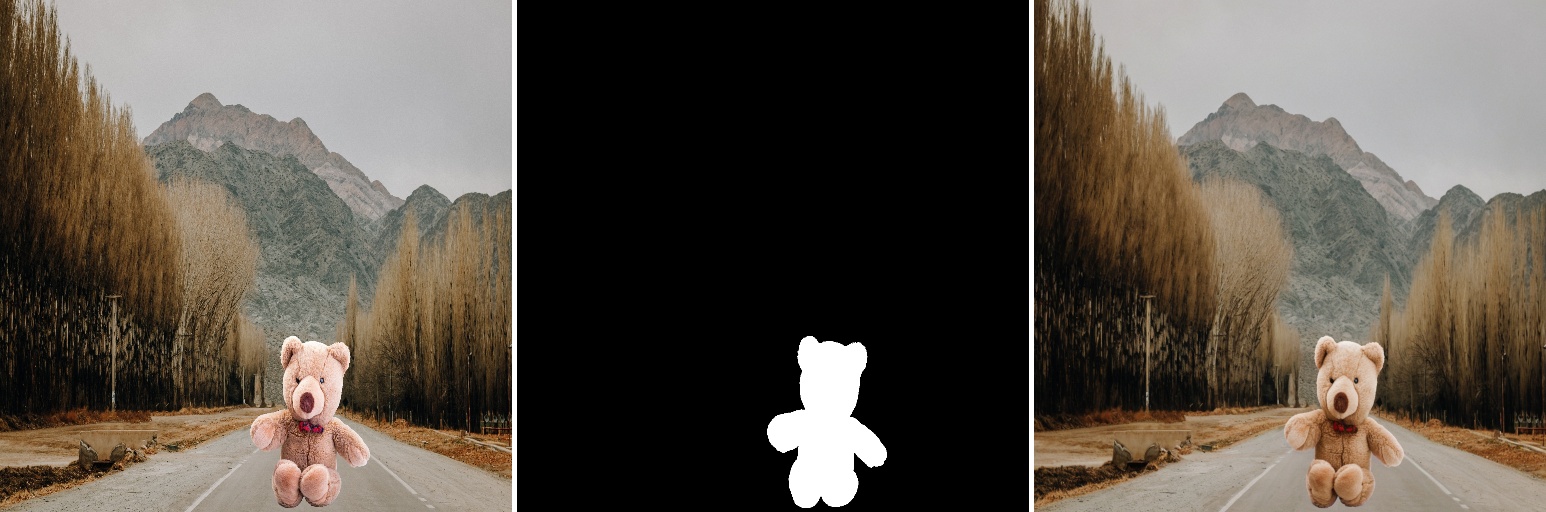
- __call__(composite_image, composite_mask, **kwargs)
Given a composite image and a foreground mask, perform harmonization on the foreground.
- Parameters
composite_image (str | numpy.ndarray) – The path to composite image or the compposite image in ndarray form.
composite_mask (str | numpy.ndarray) – Mask of composite image which indicates the foreground object region in the composite image.
**kwargs – Extra parameters for inference (e.g., steps=4, resolution=1024 for LBM).
- Returns
The harmonized result.
- Return type
harmonized_image (np.array)
libcom.inharmonious_region_localization
- class libcom.inharmonious_region_localization.InharmoniousLocalizationModel(device=0, model_type='IHDRNet', **kwargs)[source]
Inharmonious region localization model.
- Parameters
device (str | torch.device) – gpu id
model_type (str) – predefined model type
kwargs (dict) – other parameters for building model
Examples
>>> from libcom import InharmoniousLocalizationModel
>>> import cv2
>>> net = InharmoniousLocalizationModel(device=0)
>>> comp_img1  = '../tests/source/composite/comp1_MadisNet.png'
>>> inharmonious_localization1 = net(comp_img1)
>>> comp_img2  = '../tests/source/composite/comp2_MadisNet.png'
>>> inharmonious_localization2 = net(comp_img2)
>>> cv2.imwrite('../docs/_static/image/inharmonious_localization_result1.jpg', np.concatenate([cv2.resize(cv2.imread(comp_img1),(256,256)), inharmonious_localization1],axis=1))
>>> cv2.imwrite('../docs/_static/image/inharmonious_localization_result2.jpg', np.concatenate([cv2.resize(cv2.imread(comp_img2),(256,256)), inharmonious_localization2],axis=1))
Expected result:

- __call__(composite_image)
Given a composite image, predict the mask of the inharmonious region.
- Parameters
composite_image (str | numpy.ndarray) – The path to composite image or the compposite image in ndarray form.
- Returns
The inharmonious mask.
- Return type
inharmonious_mask (np.array)
libcom.painterly_image_harmonization
- class libcom.painterly_image_harmonization.PainterlyHarmonizationModel(device=0, model_type='PHDNet', **kwargs)[source]
Painterly image harmonization prediction model.
- Parameters
device (str | torch.device) – gpu id
model_type (str) – predefined model type
kwargs (dict) – use_residual (bool): whether to use adapter with residual or not for PHDiffusion
Examples
>>> from libcom.utils.process_image import make_image_grid
>>> from libcom import PainterlyHarmonizationModel
>>> import cv2
>>> import torch
>>> task_name = 'painterly_image_harmonization'
>>> MODEL_TYPE = 'PHDNet' # choose from 'PHDNet', 'PHDiffusion'
>>> comp_img = '../tests/painterly_harmonization_source/composite/3.png'
>>> comp_mask = '../tests/painterly_harmonization_source/composite_mask/3.png'
>>> net = PainterlyHarmonizationModel(device=0, model_type=MODEL_TYPE)
>>> output_img = net(comp_img, comp_mask)
>>> grid_img = make_image_grid([comp_img, comp_mask, output_img])
>>> cv2.imshow('painterly_image_harmonization_demo', grid_img)
Expected result:


- __call__(composite_image, composite_mask, sample_steps=50, strength=0.7, random_seed=None)
Generating the harmonized image for the given composite image and the corresponding composite mask.
- Parameters
composite_image (str | numpy.ndarray) – The path to the composite image or the composite image in ndarray form.
composite_mask (str | numpy.ndarray) – The path to the composite mask or the composite mask in ndarray form.
sample_steps (int) – Default total step in the inference process of PHDiffusion.
strength (float) – A hyper-parameter that decides the total step (strength * sample_steps) for PHDiffusion.
- Returns
Generated harmonized image for the given composite image and the corresponding composite mask, with BGR channel.
- Return type
preds (numpy.ndarray)
libcom.fopa_heat_map
- class libcom.fopa_heat_map.FOPAHeatMapModel(device=0, model_type='fopa', **kwargs)[source]
Generate a heatmap for a pair of scaled foreground and background.
- Parameters
device (str | torch.device) – gpu id
model_type (str) – predefined model type
Examples
>>> test_set = get_test_list_fopa_heatmap()
>>> result_dir = os.path.join(os.path.dirname(os.path.abspath(__file__)), 'results', task_name)
>>> if os.path.exists(result_dir):
>>>     shutil.rmtree(result_dir)
>>> os.makedirs(result_dir, exist_ok=True)
>>> os.makedirs(os.path.join(result_dir, 'grid'), exist_ok=True)
>>> print(f'begin testing {task_name}...')
>>> net = FOPAHeatMapModel(device=0)
>>> for pair in test_set[:1]:
>>>     fg_img, fg_mask, bg_img = pair['foreground'], pair['foreground_mask'], pair['background']
>>>     bboxes, heatmaps = net(fg_img, fg_mask, bg_img, cache_dir=os.path.join(result_dir, 'cache'), heatmap_dir=os.path.join(result_dir, 'heatmap'))
>>>     img_name  = os.path.basename(bg_img).replace('.png', '.jpg')
>>>     grid_img  = make_image_grid([bg_img, fg_img, heatmaps[0]])
>>>     res_path  = os.path.join(result_dir, 'grid', img_name)
>>>     cv2.imwrite(res_path, grid_img)
>>>     print('save result to ', res_path)
>>> print(f'end testing {task_name}!')
Expected result:


- __call__(foreground_image, foreground_mask, background_image, cache_dir, heatmap_dir, fg_scale_num=16, composite_num_choose=3, composite_num=50)
Generate a heatmap for a pair of scaled foreground and background.
- Parameters
foreground_image – foreground image path
foreground_mask – foreground mask path
background_image – background image path
cache_dir – folder path where scaled foreground images, scaled mask images and composite images are stored
heatmap_dir – folder path where heatmaps are stored
fg_scale_num – number of scales of scaled foreground images and mask images
composite_num_choose – the number of chosen composite images
composite_num – the number of composite images with the highest score
- Returns
the path of concatenated background image, foreground image and corresponding heatmap heatmap_list: the path of heatmaps
- Return type
box_list
libcom.os_insert
- class libcom.os_insert.OSInsertModel(device: str = 'cuda:0', model_dir: Optional[Union[str, Path]] = None, *, eager_aggressive_init: bool = False, objectstitch_ckpt_path: Optional[Union[str, Path]] = None, objectstitch_config_path: Optional[Union[str, Path]] = None, objectstitch_clip_dir: Optional[Union[str, Path]] = None, sam_checkpoint: Optional[Union[str, Path]] = None, flux_fill_path: Optional[Union[str, Path]] = None, flux_redux_path: Optional[Union[str, Path]] = None, ia_lora_path: Optional[Union[str, Path]] = None)[source]
High-level OSInsert interface.
This model provides a unified interface for object insertion with two modes: conservative and aggressive. It internally combines multiple sub-models such as InsertAnything, ObjectStitch, and SAM.
Modes
aggressive:ObjectStitch + SAM + InsertAnything pipeline. Suitable for more complex and flexible compositions.
conservative:Directly uses background + bbox to generate mask, then performs insertion via InsertAnything. Faster and more stable.
- param device
Device to run the model on (e.g., “cuda:0”, “cpu”).
- type device
str
- param model_dir
Root directory of all model checkpoints.
- type model_dir
str | Path | None
- param eager_aggressive_init
If True, preload ObjectStitch and SAM models at initialization. Otherwise, they will be lazily loaded when first used.
- type eager_aggressive_init
bool
- param objectstitch_ckpt_path
Path to ObjectStitch checkpoint.
- type objectstitch_ckpt_path
str | Path | None
- param objectstitch_config_path
Path to ObjectStitch config file.
- type objectstitch_config_path
str | Path | None
- param objectstitch_clip_dir
Path to CLIP model directory used by ObjectStitch.
- type objectstitch_clip_dir
str | Path | None
- param sam_checkpoint
Path to SAM (Segment Anything Model) checkpoint.
- type sam_checkpoint
str | Path | None
- param flux_fill_path
Path to Flux Fill model directory.
- type flux_fill_path
str | Path | None
- param flux_redux_path
Path to Flux Redux model directory.
- type flux_redux_path
str | Path | None
- param ia_lora_path
Path to LoRA weights for InsertAnything.
- type ia_lora_path
str | Path | None
Notes
InsertAnything is initialized during class construction.
ObjectStitch and SAM are lazily initialized (unless
eager_aggressive_init=True), and then cached for reuse.Conservative mode does not require ObjectStitch.
Examples
>>> import cv2
>>> from libcom import OSInsertModel
>>> model = OSInsertModel(
>>>     device="cuda:0"
>>> )
>>> bg = cv2.imread("tests/osinsert/background/Demo_0.png")
>>> fg = cv2.imread("tests/osinsert/foreground/Demo_0.png")
>>> fg_mask = cv2.imread(
>>>     "tests/osinsert/foreground_mask/Demo_0.png",
>>>     cv2.IMREAD_GRAYSCALE
>>> )
>>> bbox = (175, 184, 363, 372)
>>> result = model.infer_images(
>>>     background=bg,
>>>     foreground=fg,
>>>     foreground_mask=fg_mask,
>>>     bbox_xyxy=bbox,
>>>     mode="conservative",   # or "aggressive"
>>>     verbose=False,
>>>     seed=123,
>>>     strength=1.0,
>>>     split_ratio=0.33,
>>>     save_path="result_dir/conservative",
>>> )
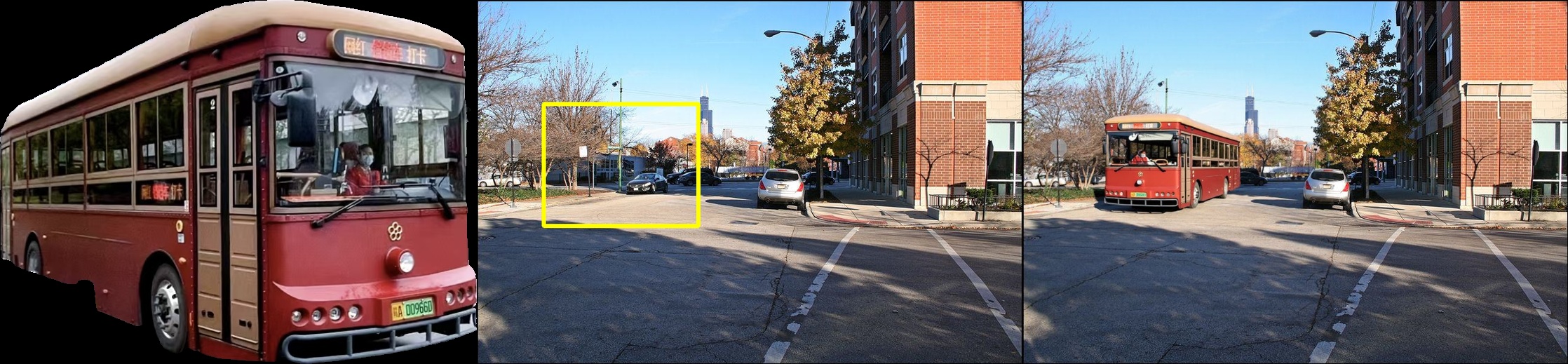
- Expected result:
The foreground object is inserted into the background image at the specified bounding box, with realistic blending.
- __call__(background_path: str | pathlib.Path, foreground_path: str | pathlib.Path, foreground_mask_path: str | pathlib.Path, bbox: list[int], result_dir: str | pathlib.Path, mode: Literal['aggressive', 'conservative'] = 'conservative', cleanup_intermediate: bool = True, verbose: bool = False, seed: int = 123, strength: float = 1.0, split_ratio: float = 0.5) numpy.ndarray | None[source]
Run a single OSInsert inference.
- Parameters
background_path – Path to the background image.
foreground_path – Path to the foreground image used as the InsertAnything reference image.
foreground_mask_path – Binary mask for the foreground image.
bbox – List containing
[x1, y1, x2, y2], specifying the insertion region on the background image.result_dir – Directory where the final composed image will be written.
mode –
"conservative": background + bbox -> mask -> InsertAnything."aggressive": ObjectStitch + SAM -> combined source/mask -> InsertAnything.
cleanup_intermediate – Deprecated. Present for backward compatibility.
verbose – If True, save intermediate artifacts into
result_dir/intermediates. Default False (do not save intermediates).seed – Random seed for InsertAnything.
strength – InsertAnything strength parameter.
Returns – Generated composited image (np.array): The inserted result.
libcom.kontext_blending_harmonization
- class libcom.kontext_blending_harmonization.KontextBlendingHarmonizationModel(device=0, model_type='Kontext_blend', **kwargs)[source]
Flux Kontext based image blending and harmonization model.
- Parameters
device (str | torch.device) – gpu id
model_type (str) – predefined model type. “Kontext_blend” refers to the version fintuned on the image blending task. “Kontext_harm” refers to the version finetuned on the image harmonization task. default: “Kontext_blend”
kwargs (dict) – other parameters for building model
Examples
>>> from libcom import KontextBlendingHarmonizationModel
>>> from libcom.utils.process_image import make_image_grid, draw_bbox_on_image
>>> import cv2
>>> net = KontextBlendingHarmonizationModel(device=0, model_type="Kontext_blend")
>>> img_names = ["000000049931.png", "000000460450.png", "6c5601278dcb5e6d_m09728_f5cd2891_17.png"]
>>> bboxes = [[168, 137, 488, 413], [134, 158, 399, 511], [130, 91, 392, 271]]
>>> test_dir  = 'tests/controllable_composition/'
>>> for i in range(len(img_names)):
>>>     bg_img  = test_dir + 'background/' + img_names[i]
>>>     fg_img  = test_dir + 'foreground/' + img_names[i]
>>>     bbox    = bboxes[i]
>>>     mask    = test_dir + 'foreground_mask/' + img_names[i]
>>>     comp    = net(bg_img, fg_img, bbox, mask)
>>>     bg_img  = draw_bbox_on_image(bg_img, bbox)
>>>     grid_img = make_image_grid([bg_img, fg_img, comp[0]])
>>>     cv2.imwrite('../docs/_static/image/kontext_result{}.jpg'.format(i+1), grid_img)
Expected result:


- __call__(background_image, foreground_image, bbox, foreground_mask=None, prompt='put it here', num_samples=1, sample_steps=28, guidance_scale=2.5, seed=321)
Kontext based image blending and harmonization.
- Parameters
background_image (str) – The path to background image.
foreground_image (str) – The path to foreground image.
bbox (list) – The bounding box which indicates the foreground’s location in the background. [x1, y1, x2, y2].
foreground_mask (None | str) – Mask of foreground image which indicates the foreground object region in the foreground image. default: None.
prompt (str) – The text prompt to guide the image generation. default: ‘put it here’.
num_samples (int) – Number of images to be generated for each task. default: 1.
sample_steps (int) – Number of denoising steps. The recommended setting is 28 for FlowMatchEulerDiscreteScheduler. default: 28.
guidance_scale (int) – Scale in classifier-free guidance (minimum: 1; maximum: 20). default: 2.5.
seed (int) – Random Seed is used to reproduce results and same seed will lead to same results.
- Returns
Generated images with a shape of 512x512x3 or Nx512x512x3, where N indicates the number of generated images.
- Return type
composite_images (numpy.ndarray)
libcom.reflection_generation
- class libcom.reflection_generation.ReflectionGenerationModel(device=0, model_type='ReflectionGeneration', **kwargs)[source]
Foreground reflection generation model based on diffusion model and control net.
- Parameters
device (str | torch.device) – gpu id
model_type (str) – predefined model type
kwargs (dict) – other parameters for building model
Examples
>>> from libcom import ReflectionGenerationModel
>>> from libcom.utils.process_image import make_image_grid
>>> import cv2
>>> net = ReflectionGenerationModel(device=2, model_type='ReflectionGeneration')
>>> comp_image1 = "../tests/reflection_generation/composite/1.png"
>>> comp_mask1 = "../tests/reflection_generation/composite_mask/1.png"
>>> preds = net(comp_image1, comp_mask1, number=5)
>>> grid_img  = make_image_grid([comp_image1, comp_mask1] + preds)
>>> cv2.imwrite('../docs/_static/image/reflection_generation_result1.jpg', grid_img)
>>> comp_image2 = "../tests/reflection_generation/composite/2.png"
>>> comp_mask2 = "../tests/reflection_generation/composite_mask/2.png"
>>> preds = net(comp_image2, comp_mask2, number=5)
>>> grid_img  = make_image_grid([comp_image2, comp_mask2] + preds)
>>> cv2.imwrite('../docs/_static/image/reflection_generation_result2.jpg', grid_img)
Expected result:


- __call__(composite_image, composite_mask, number=5, seed=42)
Generate reflection for foreground object.
- Parameters
composite_img (str | numpy.ndarray) – The path to composite image or composite image in ndarray form.
composite_mask (str | numpy.ndarray) – The path to foreground object mask or foreground object mask in ndarray form.
number (int) – Number of images to be inferenced. default: 5.
seed – Random Seed is used to reproduce results and same seed will lead to same results.
- Returns
A list of images with generated foreground reflections. Each image is in ndarray form with a shape of 512x512x3
- Return type
generated_images (list)
libcom.shadow_generation
- class libcom.shadow_generation.ShadowGenerationModel(device=0)[source]
Foreground Shadow generation model based on diffusion model.
- Parameters
device (str | torch.device) – gpu id
Examples
>>> from libcom import ShadowGenerationModel
>>> from libcom.utils.process_image import make_image_grid
>>> import cv2
>>> net = ShadowGenerationModel()
>>> comp_image1 = "../tests/shadow_generation/composite/1.png"
>>> comp_mask1 = "../tests/shadow_generation/composite_mask/1.png"
>>> preds = net(comp_image1, comp_mask1, number=5)
>>> grid_img  = make_image_grid([comp_image1, comp_mask1] + preds)
>>> cv2.imwrite('../docs/_static/image/shadow_generation_result1.jpg', grid_img)
>>> comp_image2 = "../tests/shadow_generation/composite/2.png"
>>> comp_mask2 = "../tests/shadow_generation/composite_mask/2.png"
>>> preds = net(comp_image2, comp_mask2, number=5)
>>> grid_img  = make_image_grid([comp_image2, comp_mask2] + preds)
>>> cv2.imwrite('../docs/_static/image/shadow_generation_result2.jpg', grid_img)
Expected result:


- __call__(shadowfree_img, object_mask, number=5)[source]
Generate shadow for foreground object.
- Parameters
shadowfree_img (str | numpy.ndarray) – The path to composite image or composite image in ndarray form.
object_mask (str | numpy.ndarray) – The path to foreground object mask or foreground object mask in ndarray form.
number (int) – Number of images to be inferenced. default: 5.
- Returns
A list of images with generated foreground shadows. Each image is in ndarray form with a shape of 512x512x3
- Return type
generated_images (list)